 PostEase
GuidesPublished
Use the PostEase API
Create, schedule and read posts, the inbox and media from your own code with a Pro plan token: every route, the response shape and the errors.
where this happens in the app
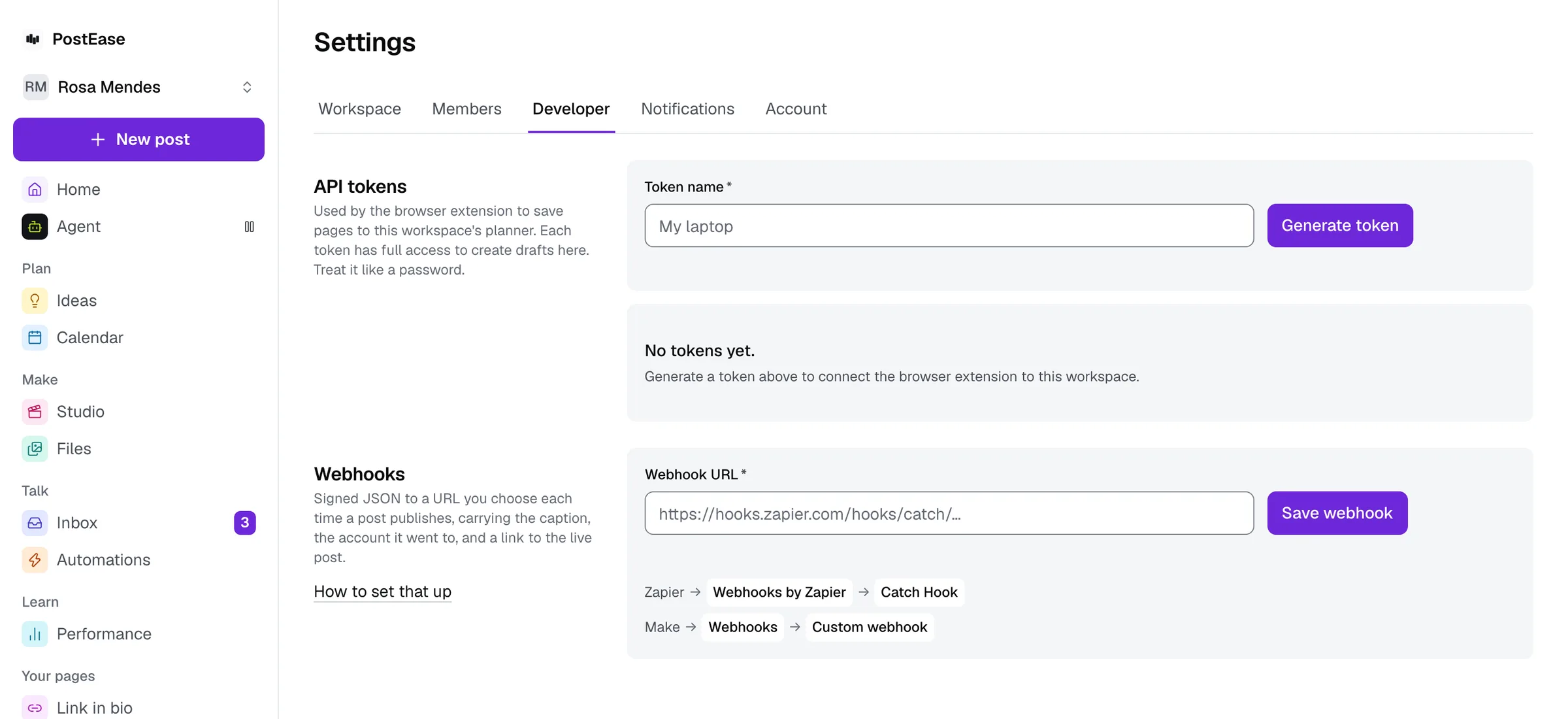
1. Create a token
On the Pro plan, open Settings, then Developer, and create a token. It is shown once, so copy it then. Each token belongs to one workspace, and every request made with it reads and changes that workspace only. Revoke a token on the same page; it stops working at once.
Send it on every request as Authorization: Bearer pe_…, with JSON bodies and Content-Type: application/json. Every address below starts with https://postease.co/api/v1.
2. Read the response
A success is a JSON object whose data field holds the answer, with meta.requestId beside it. A failure is a JSON object whose error field holds a code and a message that says what to change.
401 unauthorized: the token is missing, unknown or revoked. 403 plan_required: the workspace is not on Pro. 404 not_found: the id is not in this workspace, which is also the answer for another workspace’s id. 409 conflict: the post has already started publishing. 422 validation: the body cannot be saved as sent, and the message says why. 500 internal: try again.
3. List your channels
Every post names its channels by id, so this is the first call to make.
GET /channels. Each channel’s id, platform, name, handle, a status of connected or needs_reconnect, and capabilities: whether PostEase can publish to it, read its inbox and read its numbers.
4. Create and schedule posts
A post is created as a draft, then scheduled. The calendar shows it like any other post, and it can be edited there.
POST /posts. Send text and channel_ids, and optionally captions (text per channel id), media (ids from POST /media), campaign and source. Each channel is checked against its platform’s caption limit as that platform counts it, so a 290-character post for X is refused with “caption is 290 characters; X allows 280”. A channel with its own caption publishes that caption; every other channel publishes text. Editing the post by hand in PostEase replaces the per-channel captions with the one caption you edit. Send an Idempotency-Key header and the same key within 24 hours returns the same post instead of a second one; while the first request with a key is still creating its post, the key is answered 409 idempotency_in_progress, and a retry a few seconds later gets the post. A source of agent or extension is refused, since PostEase marks its own posts with those.
POST /posts/{id}/schedule. Send scheduled_at in ISO 8601, such as 2026-11-02T09:00:00Z. A time now or in the past publishes now. A draft, a scheduled post or a failed post can be scheduled; anything that has started publishing answers 409.
GET /posts/{id}. The post: id, text, captions, channel_ids, media, campaign, source, status, scheduled_at, published_at, error, and per_channel with each channel’s status, platform_post_id, url, error_class and error.
GET /posts?status=&campaign=&limit=. Posts newest first, up to limit (50 unless you say, 100 at most). Status is draft, scheduled, publishing, published, failed or partially_failed.
DELETE /posts/{id}. Cancels a draft, scheduled or failed post and answers with its id and status cancelled. Once any channel has started publishing, it answers 409.
When a channel fails, error_class says why in one word: auth_expired (reconnect the channel), rate_limited, media_rejected, platform_error, validation or unknown. The error field says it in a sentence.
5. Read a post’s numbers
The same numbers the post shows on the calendar.
GET /posts/{id}/metrics. Per channel: views, likes, comments, first_day_views (the first 24 hours) and retention_drop_at_s (where a YouTube video loses the most viewers). A number not yet measured is null, never 0. Shares and clicks are not measured per post yet, so they are null.
6. Answer the inbox
Comments and messages from the channels whose inbox PostEase reads.
GET /inbox?unreplied=true&limit=. Messages newest first, each with its channel, platform, author, text, created_at, whether you have replied, and post_id when it is about one of your posts.
POST /inbox/{id}/reply. Send text. The reply goes out on the message’s platform and joins the thread in the Inbox. A platform PostEase cannot reply on answers 422, for example “replies not supported on X”.
7. Add media by URL
PostEase fetches the file and keeps it in Your files, where a post can use it.
POST /media. Send url, an http or https address on the public internet. JPEG, PNG and WebP up to 25 MB, MP4 and MOV up to 500 MB, and a video’s server must state its size. The answer is the file’s id, kind, width, height and duration_s. Addresses on a private network, such as 127.0.0.1 or 169.254.169.254, answer 422.
The API is part of Pro.
Start free, then choose Pro in Billing when you are ready to connect your own code.
Questions
Which plan includes the PostEase API?
Pro. Create a token in Settings, then Developer. A token from a workspace on another plan is answered with 403 and the code plan_required.
How do I sign requests to the PostEase API?
Send the token in an Authorization header as Bearer followed by the token. A missing, unknown or revoked token is answered with 401 and the code unauthorized.
What does the API answer when a request is wrong?
A JSON object with error.code and error.message: 404 for an id that is not in your workspace, 409 for a post that has already started publishing, and 422 for a body that cannot be saved, with the reason in the message.
Keep reading
- How to connect PostEase to Zapier or Make
Send every publish to a Zapier Catch Hook or a Make webhook, with the caption, the account and a link to the live post. Send a test event to map the fields.
- Connecting PostEase to the rest of your stack
Webhooks, Zapier and Make, importing a calendar from another scheduler, and the browser extension: every way PostEase connects to your other tools.
- Saving a page to your planner while browsing
A browser extension turns any page into a draft in your calendar, using a Pro plan API token. Manual install for now; it is not on the Chrome Web Store.
- Import your calendar from another scheduler
Upload a CSV from Metricool or Hootsuite, map the columns, and your next two weeks land on the calendar as drafts, even before every channel is reconnected.